Why hardware wallets matter for lending
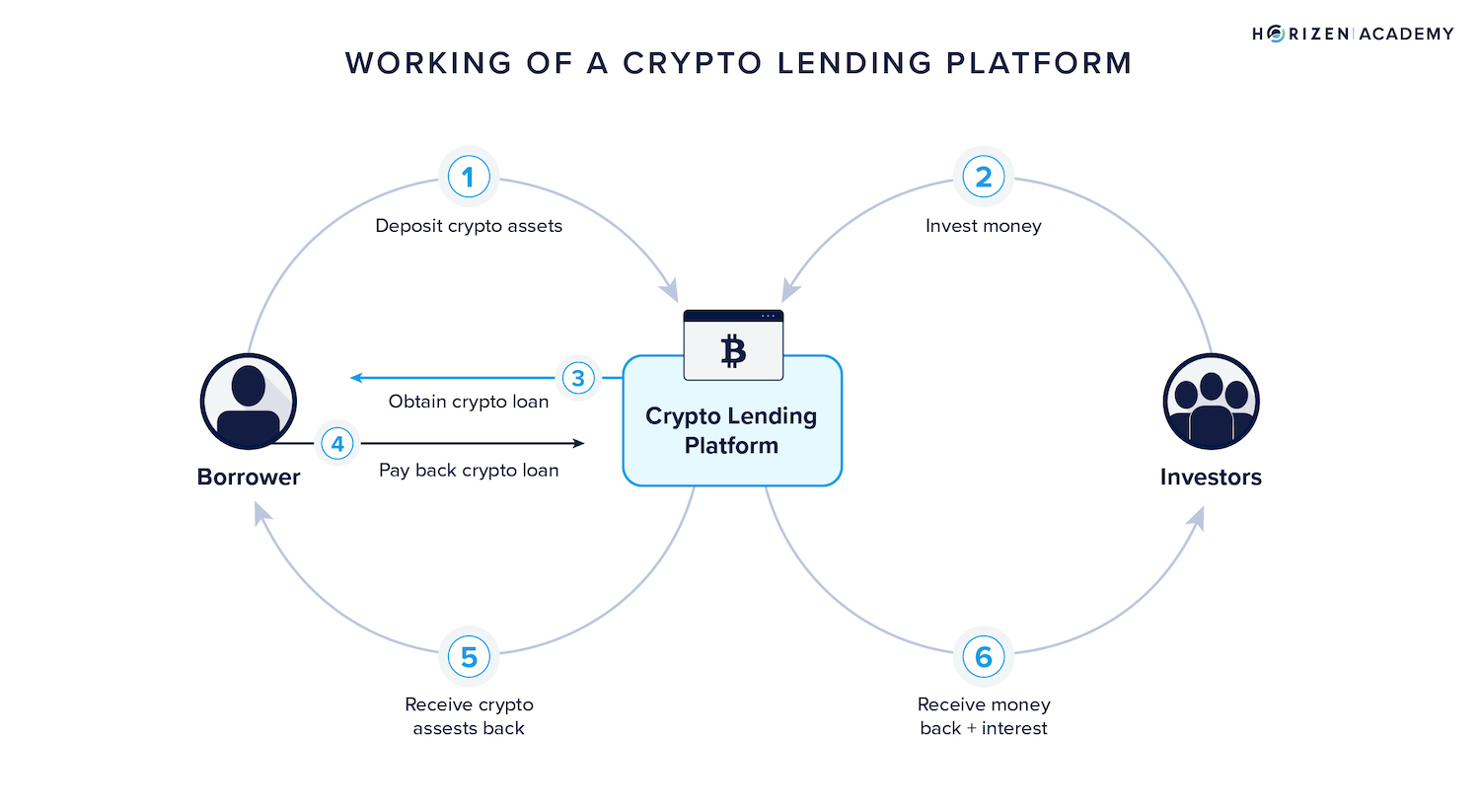
Crypto lending offers yields that outpace traditional savings, but it introduces significant counterparty risk. When you deposit funds into a centralized platform, you are effectively acting as the bank, trusting them to manage your private keys and honor their obligations. History demonstrates that this trust is often misplaced; the collapses of Celsius and FTX resulted in billions in losses because users did not hold the keys to their own assets.
A hardware wallet enables self-custody, keeping your private keys offline and isolated from internet-connected devices. For lending strategies, this ensures you retain full control over your collateral. If you are using crypto-backed loans, your assets remain secured by a physical device rather than sitting in a corporate vault. This separation of custody and lending protocol is the primary defense against platform insolvency.
Choosing the right hardware wallet is the first step in securing your lending strategy. Devices like the Ledger Nano X or Trezor Model T provide the necessary security infrastructure to manage your crypto assets safely. By keeping your keys offline, you eliminate the risk of remote theft and ensure that your yield-generating assets remain under your sole control.
Best hardware wallets for crypto lending
When you lend crypto, you are essentially acting as the bank. Your private keys are the collateral that keeps your assets safe from platform insolvency, hacks, or freezing. If you lose access to your keys, your yield disappears. A hardware wallet is not just a storage device; it is the physical barrier between your digital wealth and the internet.
Choosing the right wallet depends on which coins you hold and which lending platforms you plan to use. Most major wallets support Ethereum, Bitcoin, and major stablecoins, but support for niche altcoins varies. The goal is to find a device that balances robust security with the connectivity you need to interact with lending protocols.
Ledger Nano X
The Ledger Nano X is a top choice for lenders who value flexibility. Its Bluetooth connectivity allows you to manage your portfolio and sign transactions directly from your phone, which is convenient for monitoring lending positions on the go. It supports over 5,500 coins, ensuring compatibility with most lending platforms that accept a wide range of collateral.
Security is handled by a secure chip certified to EAL5+ standards, the same level used in passports and payment cards. The device requires physical confirmation for every transaction, meaning even if your computer is compromised, your funds remain safe. While the screen is small, it is sufficient for verifying transaction details before signing.
Trezor Model T
Trezor Model T offers a distinct advantage with its touchscreen interface, making it easier to enter passphrases and verify addresses without relying on small buttons. It is an open-source device, which appeals to users who prefer transparency in their security hardware. Like Ledger, it supports a vast array of cryptocurrencies, including many that are less common on other platforms.
The Model T includes a built-in web interface for managing your assets, which can simplify the process of setting up multiple wallets for different lending strategies. Its physical buttons provide a tactile confirmation step, adding a layer of security that is hard to bypass remotely. This makes it a strong candidate for users who prioritize open-source verification and user-friendly interaction.
KeepKey
KeepKey is known for its large display, which shows more transaction details on screen than most competitors. This can be crucial when verifying complex smart contract interactions required by some lending platforms. The device is built with a focus on durability and simplicity, featuring a single large button for confirmation.
While it supports fewer coins than Ledger or Trezor, it covers all the major assets needed for most lending activities, including Bitcoin, Ethereum, and popular stablecoins. Its straightforward design reduces the learning curve for new users, making it a reliable option for those who want a no-frills, secure storage solution.
| Model | Security Feature | Connectivity | Coin Support |
|---|---|---|---|
| Ledger Nano X | EAL5+ Secure Chip | Bluetooth, USB-C | 5,500+ |
| Trezor Model T | Open Source, Secure Element | USB-C, Wireless (via app) | 1,800+ |
| KeepKey | Secure Element | USB-C | 50+ |
Choosing the Right Wallet
Your choice should align with your lending strategy. If you hold a diverse portfolio of altcoins, Ledger’s extensive support list is advantageous. If you prioritize open-source security and a modern interface, Trezor Model T is a strong contender. For those who value large-screen verification for complex transactions, KeepKey offers a unique advantage.
Regardless of the device, always purchase from the official manufacturer to avoid tampered units. Enable all available security features, such as PIN codes and recovery seed backups, stored offline in a secure location. Your hardware wallet is the foundation of your self-custody strategy; treat it with the same care as your physical cash.


As an Amazon Associate, we may earn from qualifying purchases.
How to secure your lending collateral
When you pledge crypto assets as collateral for a loan, the security of your hardware wallet becomes the single most important factor in your strategy. Unlike a bank account, there is no customer support line to reverse a transaction or recover a stolen seed phrase. Your hardware wallet is the vault, and your seed phrase is the only key. If you compromise either, you lose your collateral—and potentially face liquidation if the loan position becomes unstable.
The process of securing your collateral begins long before you connect your device to a lending platform. It starts with how you generate, store, and verify your recovery phrase. Below is the step-by-step process to ensure your assets remain under your sole control.

Before you initialize your device, inspect the packaging for tampering. Legitimate hardware wallets come in sealed boxes with holographic stickers or anti-tamper seals. If the box feels resealed or the seals are broken, do not use it. Once you power on the device, verify the model name and serial number against the manufacturer’s official database. This step prevents you from accidentally using a compromised device that may have been pre-loaded with malicious firmware.
During the initial setup, your device will generate a unique recovery phrase, typically consisting of 12 or 24 words. Write these words down on the provided seed recovery card or a piece of metal backup. Never type them into a computer, take a photo with your phone, or store them in any digital format. The moment these words exist in a digital file, they are vulnerable to malware, cloud backups, and keyloggers. Physical isolation is the only way to guarantee that no third party can access your funds.
Your seed phrase is more valuable than cash. Store it in a fireproof safe or a secure deposit box at a bank. Avoid hiding it in obvious places like under a mattress or in a desk drawer. If you live in an area prone to natural disasters, consider using a steel seed plate to protect the words from fire and water damage. Remember: if you lose this phrase, your collateral is gone forever. If someone else finds it, they own it.
After writing down your phrase, the device will ask you to re-enter specific words to confirm you recorded them correctly. Do not rush this step. Many users skip this verification, assuming they remembered the words correctly. If you enter the wrong words, your device will generate a different wallet, and you will lose access to your funds. Double-check each word against your physical backup before proceeding.

Once your device is set up, connect it to your computer or mobile device to interact with the lending platform. Ensure you are using the official firmware and that the device displays the transaction details on its own screen before you approve any transfer. Never approve a transaction on your computer screen alone; the hardware wallet’s display is your final line of defense against phishing sites and malicious scripts.
By following these steps, you ensure that your collateral remains under your exclusive control. This self-custody approach minimizes the risk of exchange hacks or platform insolvency, keeping your assets safe even in volatile market conditions.
Common risks in crypto lending strategies
Crypto lending isn't just about depositing assets and watching them grow. It is a complex financial activity that carries specific, high-stakes risks. While the yield can be attractive, the underlying mechanics expose you to market volatility, platform insolvency, and technical failures. Understanding these risks is the first step in protecting your capital.
Liquidation risk
When you borrow against your crypto holdings, you are essentially taking out a secured loan. The value of your collateral must remain above a certain threshold. If the market price of your Bitcoin or Ethereum drops sharply, the lending platform may liquidate your assets to cover the loan. This happens automatically and often at the worst possible moment. Keeping a healthy loan-to-value ratio is your primary defense, but it doesn't eliminate the risk entirely.
Smart contract vulnerabilities
Many crypto lending protocols operate on decentralized exchanges using smart contracts. These are self-executing codes that manage the lending process. However, code is not infallible. Bugs or exploits in these contracts can lead to the loss of funds, as seen in several high-profile DeFi hacks. Unlike traditional banks, there is no insurance fund or FDIC protection to reimburse you if a contract is compromised. Your assets are only as safe as the code securing them.
Platform counterparty risk
Centralized lending platforms hold custody of your assets. This introduces counterparty risk—the possibility that the platform itself could become insolvent, be hacked, or face regulatory action. If the platform fails, you may lose access to your funds completely. This is why self-custody is so critical. By keeping your assets in a hardware wallet, you retain control. You can move your collateral to a safer environment or withdraw it if you sense trouble, rather than being locked into a failing platform.
Mitigating risk with hardware wallets
Hardware wallets like the Ledger Nano X or Trezor Model T provide a physical layer of security. They keep your private keys offline, protecting them from online hacks and phishing attacks. While they don't prevent smart contract exploits or liquidations, they ensure that your assets remain under your sole control. This self-custody approach is the most effective way to mitigate platform risk. It allows you to participate in lending strategies without surrendering ownership of your crypto to third parties.
Always verify the smart contract address and platform reputation before depositing funds. Use official sources and community audits to assess risk.
Frequently asked questions about crypto lending
Can I use a software wallet for lending collateral?
Software wallets are connected to the internet, making them vulnerable to malware and phishing attacks. For high-value collateral, a hardware wallet is strongly recommended to ensure offline security.
What happens if I lose my hardware wallet?
If you have your seed phrase written down securely, you can recover your funds on a new device. Without the seed phrase, your funds are permanently lost.
Do I need to keep my hardware wallet plugged in?
No. Your hardware wallet only needs to be connected when you are signing a transaction. For daily security, keep it disconnected and stored in a safe place.
No comments yet. Be the first to share your thoughts!